Check Google Search Results for Keywords Online
What do you see when you enter a keyword in Google's search box? Your website, competitor pages, ads, or a special block with a ready-made answer? Tracking this for individual queries is difficult, and if you have dozens or even hundreds of keywords whose search results you want to check, doing it manually is practically impossible.
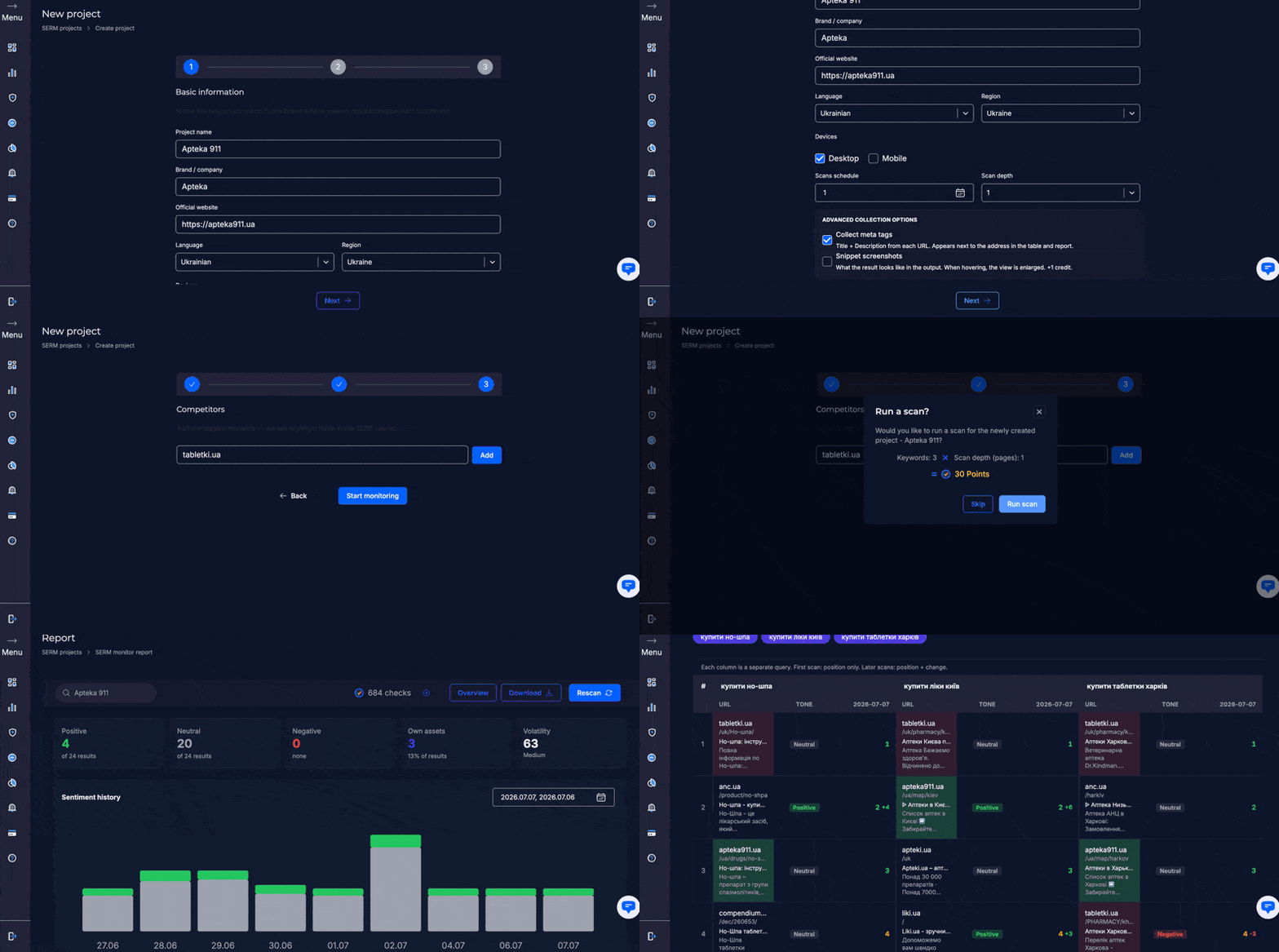
Checking Google search results for keywords on SEO-Checker solves this problem in seconds. The tool shows not only your site's position, but the entire search results page: organic listings, ads, SERP features — all for any region, search language, and device.
A regular browser search doesn't give an objective picture for SEO tasks. The main factors that affect how search results differ for different people are location and device type: the same query from Kyiv and, say, Warsaw can show different sites and ads. Incognito mode won't help you get a more objective result either — it only removes personalization based on search history, but it won't hide your actual geolocation from Google and certainly won't replace it. That's why quality SEO work requires a dedicated tool that shows search results the way a user in a specific country or even city would see them.
This format is convenient for a variety of tasks. For example, a business owner needs to know whether a product page holds its place alongside competitor offers (and what that place is). An SEO specialist needs to see exactly how search results change after page optimization. An agency managing several client projects at once needs to keep all checks in one convenient place, not scattered across different services. And a SERM manager needs to analyze search results for a brand from time to time to spot negative publications in the top results early and respond in time.
What tasks is search results checking used for
Let's look at four likely scenarios. Each has its own logic, set of parameters, and outcome.
SEO analysis and website position tracking
The classic task is to check where your site ranks for a specific keyword and how ranking changes over time. The tool not only shows your position in the top 100, but also displays the full context around your site in the SERP: ads, special features, organic competitors. This makes it easier to understand whether real promotion is needed or light edits are enough. This data is also useful for internal reporting: management can better assess real progress when there is a visual history of position changes, not just dry numbers in a regular table.
Competitor analysis in search results
See which sites consistently hold high positions in search results, which SERP features they use, and how their results differ from yours. This helps you notice trends that give your competitors an edge in the search engine — and provides a basis for analyzing what you can replicate or even outperform. Comparing several checks over time also shows whether a competitor is systematically growing positions or it's just a one-time jump after a particular publication.
SERM monitoring of brand reputation in search
The same "checking reputation in Google." As a SERM service, SEO-Checker lets you view Google's reputation SERP for a company or brand name and check whether positive or negative mentions and reviews prevail. Regular analysis of search results for a brand helps you spot a problem in time and start working on it before it gains momentum. If something undesirable appears in the top results, early detection gives you time to prepare an official response or push positive content higher. This is especially important before launching an advertising campaign or entering a new market, when first impressions of the brand are formed primarily through search.
Keyword selection and effectiveness check before an ad campaign
Before launching ads, it's useful to see the search results for the queries you need in advance: how many ads with certain keywords are already competing for customers, how strong competitors are in organic results, and whether it makes sense to compete for a specific keyword in this niche at all. These actions save budget at the planning stage by allowing you to filter out overly competitive queries in advance or, conversely, find undervalued keywords with low competition.
Despite different goals, all four scenarios share one thing: decisions are always easier when you have the real search results in front of you, not just assumptions about what search looks like for a specific query at a given moment.
How the service works
Technically, checking search results doesn't require any specific settings or third-party software — everything happens directly in the browser in a few simple steps. The key is to specify search parameters correctly and accurately, because they determine the results you ultimately get.
- Enter the keyword you want to check.
- Select region, search language, and device — desktop or mobile.
- Get the full Google SERP for that query.
- Review organic results and SERP features: featured snippets, ads, local packs.
- Save the result or compare it with a previous check.
After getting the SERP, it's worth paying attention not only to your site's positions, but also to the overall page structure: how much space ads take up, whether a local pack is present. These details affect how much traffic actually goes to organic results, even if your site is formally at the very top.
This approach works for both a regular one-time check and regular weekly or monthly monitoring, when it's important to see how page rankings in search results change over time. It's regularity that often delivers the most valuable insights: a single check shows only the current state, while a series of checks reveals the real trend and pace of change.
A common mistake is to check search results only once and immediately draw final conclusions. Search results can change temporarily due to regular Google algorithm updates or seasonal demand fluctuations, so several checks spaced a few days apart usually give a much more reliable picture.
Convenient results viewing
Raw SERP data and an awkward interface wouldn't be much use to users — especially when there are many checks that need to be constantly compared. That's why SEO-Checker includes several convenient solutions for comfortable work:
| Feature | What it gives you |
|---|
| Results table/list | All positions, ads, and SERP features collected in a convenient format |
| Saving SERP snapshots | A search results screenshot that doesn't expire: you capture the situation as it was at a specific moment to return to it later with analysis |
| Comparing SERPs over time | See how search results changed over a week, month, or any other period |
| Sentiment labels | Clear indication of position change dynamics in search results: improvement, decline, or no change between two checks |
| Filters | Ability to view changes for one keyword or several at once |
| Report export | A ready file in XML, CSV formats, or a Google Sheet or link to a generated report within the system |
Together, these tools let you not just see the SERP once, but systematically track how it changes over time.
Advantages of working with us
We built SEO-Checker so that checking search results takes minimal time while delivering maximum useful data — without extra steps or complex settings. Among the tool's main advantages:
Fast results.
Search results for a keyword are generated almost instantly — no waiting or manual page refreshing required. Even when bulk-checking hundreds of keywords at once, processing takes minimal time.
Accuracy and data freshness.
The service always shows the real current Google SERP, not outdated cache or approximate data. This matters when you need to quickly review reputation search results for a brand and make an informed decision based on fresh information, not assumptions.
Checks for any region, language, and device.
Search results depend on user location; desktop and mobile results usually differ as well. At SEO-Checker we've accounted for this and added the ability to choose the parameters you need.
Plans for different task volumes.
Need just one check or daily monitoring of hundreds of keywords? The plan is flexible, so you can tailor it to your specific tasks without overpaying for features you don't need. And if you need to change plans, the switch happens without losing your accumulated check history.
Convenient interface with no software installation.
Everything works right in the browser: no downloads, no extra training. All the features you need are in one place — you won't have to keep multiple tabs or third-party services open at the same time.